

Over the last 16 years, we’ve had the opportunity to work with well over 500 organizations across North America and a few in other countries as well. During that time, one of the unfortunately very common issues that we see time and time again is customers not knowing their passwords for one of their services. Either for their domain registrar, email accounts, Apple or Google accounts, or another vital service. In many cases, the passwords can be recovered through the typical “forgot password” procedures, but in some cases, those procedures require additional information. Further complicating the issues, some don’t remember the email address that was used for the account, which leads to disruption in their business or activities.
Fortunately, all you need is a bit of discipline when you create a new account and a central place to store your username and passwords. A good basic approach which is better than nothing or using sticky notes would be to use an online spreadsheet such as Google Spreadsheet or the notes app on your phone; however, it usually means that your passwords are displayed in plain text or in a less secure fashion and again, it is still not ideal when using randomly generated passwords.
Password managers come to the rescue.
With password managers, you create an account and all your username and passwords are stored securely in the cloud and available on all your devices. They are simple and straightforward to use, and easy to make into a habit. They usually offer shortcuts (plugins or extensions) as well so that you can easily pull your passwords from your account to make signing in a breeze. Once that is set up, using your passwords is easy and you can then start to use more secure randomly generated passwords using tools like Norton Password Generator or NordPass Password Generator. There are plenty of companies offering password managers but at 14 Oranges, we have settled on using Bitwarden.
Bitwarden – An Easy to Use Password Manager
Bitwarden is a simple password manager and is available as an application on Windows, Mac OS X, Linux as well as iOS and Android. They also offer browser extensions for all the major browsers Chrome, Edge, Safari, Firefox, Opera, and even DuckDuckGo!
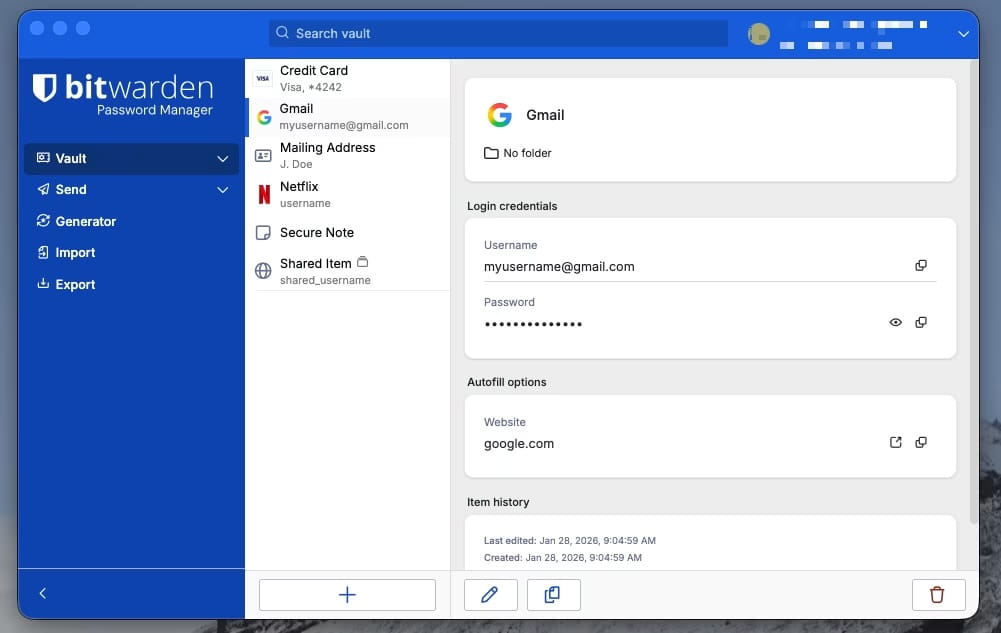
Signing up is easy. They offer a free plan for personal use which for many is sufficient and is a great improvement over all the other mechanisms discussed earlier. Once your account is created, you can start to store your passwords in there. All your passwords are protected via a master password (you enter it once when you launch the app) and there is no limit to the number of passwords stored and you can organize your passwords in folders making them easy to group and organize. There is also a powerful search feature allowing you quickly find what you need. You can also store notes which can be used to store security questions or recovery codes.
Once entered, your passwords are then available securely on all your devices. They offer quick shortcuts in the app to copy/paste your password without ever displaying or revealing the actual password. You don’t have to worry about nosy neighbors looking over your shoulder. Browser extensions can also help filling your passwords when needed as well.
Bitwarden also allows you to perform a check to see if your password has been previously exposed by securely comparing hashed versions of your stored passwords against known data breach databases, primarily using the Have I Been Pwned API. A good feature if you insist on using the same password you’ve been using since 1994 or you know that a service you’ve been using has been recently compromised by hackers.
If sharing of passwords is necessary for your business, Bitwarden offers Business Plans that allow password sharing between employees. This feature is critical for ensuring business continuity should an employee suddenly leave your business.
Bitwarden can also help you manage Passkeys? What are Passkeys? Well that will be a topic for a future post!
Just Do It
Although switching to a password manager can seem like a daunting task, it really isn’t and once you have done the switch, you’ll be asking yourself “Why did I wait so long to switch?”. So to steal an old saying: Just Do It!
Note: 14 Oranges is not affiliated with Bitwarden. We just like using their product.
Featured Image by Jason Dent on Unsplash
Share This Article